Examples
Updated 2026-10-14
Each example is a folder that you can download. The folder contains a function, a sample input and the output of a run of the function. To start an example, you must have a Jinn sign-in and a model provider.
Before you start
Sign in to the CLI. Then add a provider named openai with your own key, as in the quickstart. The examples do not name a provider. Thus they use the only provider of your account, at its latest version.
$ jinn login
$ echo "$OPENAI_API_KEY" | jinn provider openai --vendor openai --model gpt-5.2 --effort medium
→ openai prv_8c1f04d2a7b93e650f1a2c47 v1 · use prv_8c1f04d2a7b93e650f1a2c47@latest in a function's provider
All vendors and models work. If your account has more than one provider, add "provider": "openai" (or a different name) to the agent of the function. Do this before you publish the function.
The runs on this page used the OpenAI model gpt-6-luna, with low reasoning effort. A model gives a different answer each time. Thus your output will not be the same as the output on this page.
Each folder contains:
| Path | Contents |
|---|---|
function.json | The function. Publish it one time with jinn publish. |
in/ | A sample input folder. jinn run --in ./in sends it. |
out/ | The output of the run on this page. Compare it with your output. |
Answer a support ticket
A customer writes that Acme charged their card two times. The agent reads the ticket and the billing policy. It finds the customer with a custom tool. Then it returns a reply to send and the refunds to make.
Your service sends the reply and makes the refunds. In production, start the run from the webhook of your help desk. Send reply.md when you receive the result.
support-triage/
  function.json
  in/policy.md
  in/ticket.json
  out/actions.json
  out/reply.md
{
"name": "support-triage",
"agent": {
"system_prompt": "You answer billing tickets for Acme. /workspace/in contains the ticket (ticket.json) and the billing policy (policy.md). Find the customer with lookup_customer and the email address of the ticket. Obey all rules of the policy. Write the reply to the customer in /workspace/out/reply.md. Write the refunds to make in /workspace/out/actions.json, as a JSON array of {\"charge\": id, \"amount\": number, \"reason\": text}. If there are no refunds, write []. Write in ASD-STE100 Simplified Technical English. Then call complete.",
"custom_tools": [{
"name": "lookup_customer",
"description": "Finds a customer by email address. Returns the plan, seats, prices and recent charges of the customer.",
"parameters": { "type": "object", "properties": { "email": { "type": "string" } }, "required": ["email"], "additionalProperties": false },
"url": "https://docs.usejinn.com/tools/lookup-customer",
"secret": "sk_example_support"
}]
},
"input_manifest": [
{ "path": "ticket.json", "description": "The ticket" },
{ "path": "policy.md", "description": "The billing policy" }
],
"output_manifest": [
{ "path": "reply.md", "description": "The reply to send" },
{ "path": "actions.json", "description": "The refunds to make" }
]
}lookup_customer is an endpoint that Jinn serves for this example, at https://docs.usejinn.com/tools/lookup-customer. It knows two sample customers. It answers only a call with the secret sk_example_support. When the agent calls the tool, Jinn sends the arguments of the call to the endpoint:
POST https://docs.usejinn.com/tools/lookup-customer
Authorization: Bearer sk_example_support
Jinn-Run: run_22fa477e0afd7c3149b7573a
{"email": "maria.lopez@brightpath.io"}
← 200 {"email": "maria.lopez@brightpath.io", "name": "Maria Lopez", "company": "Brightpath", "plan": "Team, monthly", "seats": 12, "price_per_seat_month": 29, "price_per_seat_year": 290, "charges": [ … ]}
To use your own customer data, serve the same call from your service. Put the address and the secret of your service in the tool. Jinn keeps the secret encrypted. The secret does not go into the VM.
The input is the ticket and a policy of four rules:
{
  "id": 4812,
  "from": "maria.lopez@brightpath.io",
  "subject": "Charged twice this month",
  "received_at": "2026-10-03T08:14:00Z",
  "body": "Hi, our card was charged twice for the Team plan on 1 October. Can you refund the extra charge? Also, we would like to switch to annual billing if it works out cheaper. Thanks, Maria"
}
# Billing policy
- If a charge is a duplicate, refund it in full to the same card. The refund arrives in 5 business days or less. Do not refund a charge that is not a duplicate.
- A customer can change from monthly billing to annual billing at any time. The annual price starts at the next renewal. The customer makes the change in Settings → Billing → Change plan. Support does not make the change.
- Use the prices from the record of the customer. Do not offer discounts.
- Sign each reply "Sam, Acme Support".$ curl -sL https://docs.usejinn.com/examples/support-triage.tar.gz | tar -xz
$ cd support-triage
$ jinn publish function.json
→ support-triage fnc_a3b59df3be29992f250c2e1e v12
$ jinn run support-triage --prompt "Ticket #4812: charged twice" --in ./in --out ./result
run_22fa477e0afd7c3149b7573a queued · support-triage v12
run_22fa477e0afd7c3149b7573a running
agent bash {"command":"cat /workspace/in/ticket.json; printf '\\n---POLICY---\\n'; cat /workspace/in/policy.md","timeout_ms":300000,"workdir":"/workspace"}
agent lookup_customer {"email":"maria.lopez@brightpath.io"}
agent bash {"command":"mkdir -p /workspace/out && cat > /workspace/out/reply.md <<'EOF'\nHi Maria,\n\nWe found two payments of $348 for the Team plan on 1 October. We w…
agent complete {}
✓ succeeded in 14s
result/actions.json 120 B
result/reply.md 510 Bresult/actions.json gives the one duplicate charge:
[
  {
    "charge": "ch_3Q8xK22",
    "amount": 348,
    "reason": "Duplicate Team plan charge on 1 October 2026"
  }
]
result/reply.md answers the two questions. It uses the prices from the tool and the signature from the policy:
Hi Maria,

We found two payments of $348 for the Team plan on 1 October. We will refund one payment of $348 to the same card. The refund should arrive within 5 business days.

Your current monthly price is $348 for 12 seats. Annual billing costs $3,480 per year for 12 seats. This is $696 less than 12 monthly payments at the current price. The annual price starts at your next renewal. To change billing, go to Settings → Billing → Change plan. Support cannot make this change for you.

Sam, Acme Support
Review a pull request
A CI job sends the repository at the base commit, and the change as a diff. The agent applies the diff, runs the tests and reviews the change. The sample is a small Python module that calculates the price of a cart. The change adds a discount for large quantities.
pr-review/
  function.json
  in/change.diff
  in/repo/README.md
  in/repo/cart/__init__.py
  in/repo/cart/pricing.py
  in/repo/tests/__init__.py
  in/repo/tests/test_pricing.py
  out/comments.json
  out/review.md
{
"name": "pr-review",
"agent": {
"system_prompt": "You review a code change. /workspace/in/repo is the repository at the base commit, without .git. /workspace/in/change.diff is the change. Copy the repository to /workspace/repo. Apply the change there with git apply. Run the tests. The README tells you how. Examine the change for errors, missing tests and text that is not clear. Report only important problems, the most important problem first. Write the review in /workspace/out/review.md: first a verdict (approve or request changes), then each problem with its file and line. Write line comments in /workspace/out/comments.json, as a JSON array of {\"path\": text, \"line\": number, \"body\": text}. Use the line numbers of the changed file. Write in ASD-STE100 Simplified Technical English. Then call complete."
},
"input_manifest": [
{ "path": "repo/", "description": "The repository at the base commit" },
{ "path": "change.diff", "description": "The change" }
],
"output_manifest": [
{ "path": "review.md", "description": "The review" },
{ "path": "comments.json", "description": "Line comments" }
]
}To make the same input from your repository in CI:
git archive origin/main | tar -x -C in/repocopies the base commit without.git.git diff origin/main...HEAD > in/change.diffwrites the change.
If the run fails, jinn run exits with status 1. Thus the CI step also fails.
$ curl -sL https://docs.usejinn.com/examples/pr-review.tar.gz | tar -xz
$ cd pr-review
$ jinn publish function.json
→ pr-review fnc_df4a8e0e37c74cfeb2ac9c32 v4
$ jinn run pr-review --prompt "Review the change: a bulk discount for large orders." --in ./in --out ./result
run_7f933166d5deb68977b54366 queued · pr-review v4
run_7f933166d5deb68977b54366 running
agent  bash {"command":"cp -a /workspace/in/repo /workspace/repo && cd /workspace/repo && git init -q && git apply /workspace/in/change.diff && cat README*","timeout_ms"…
agent  bash {"command":"cd /workspace/repo && find . -maxdepth 3 -type f -not -path './.git/*' -print && cat /workspace/in/change.diff && python3 -m unittest","timeout_m…
       bash → {"exit_code":1,"output":"./cart/__init__.py\n./cart/pricing.py\n./tests/test_pricing.py\n./tests/__init__.py\n./README.md\ndiff --git a/cart/pricing.py b/car…
agent  bash {"command":"cd /workspace/repo && nl -ba cart/pricing.py && cat cart/__init__.py && nl -ba tests/test_pricing.py","timeout_ms":300000,"workdir":"/workspace"}
agent  write {"content":"Request changes.\n\n- `cart/pricing.py:17` — The new bulk test fails. For 150 cents, this code rounds the discounted unit price to 142 cents, t…
agent  write {"content":"[\n {\n \"path\": \"cart/pricing.py\",\n \"line\": 17,\n \"body\": \"The new bulk test fails. At 150 cents per item, this rounds the discounted u…
agent  complete {}
✓ succeeded in 27.2s
result/comments.json 833 B
result/review.md 818 B
result/review.md gives the verdict and the problems, with the file and line of each problem:
Request changes.

- `cart/pricing.py:17` — The new bulk test fails. For 150 cents, this code rounds the discounted unit price to 142 cents, then returns 2,840 cents for 20 items. The test expects 2,850 cents. Calculate the discount on the line total, or define and test a clear rounding rule that gives the expected result.
- `cart/pricing.py:16` — The docstring says the discount starts at quantity 10, but this condition starts it above 10. An order of exactly 10 items gets no discount. Use the same limit as the stated rule.
- `cart/pricing.py:17` — This changes the price in the caller's item dictionary. A later call to `subtotal` on the same cart applies the discount again. Calculate the discounted amount without changing the input items.

The test run fails: `test_bulk` returns 2,840 instead of 2,850.
result/comments.json contains the same problems as line comments. Send them to your Git host with its API.
Write a weekly report from data
A scheduler starts a run each Monday. The input is the orders of the last two weeks, as CSV files. The agent compares the weeks and returns a report, with one chart for each change. The sample has 126 rows: orders, revenue and refunds by day, region and plan.
monday-report/
  function.json
  in/last_week.csv
  in/this_week.csv
  out/charts/apac_pro_orders.png
  out/charts/eu_starter_orders.png
  out/charts/us_team_refunds.png
  out/report.md
{
"name": "monday-report",
"setup": ["apt-get update", "apt-get install -y --no-install-recommends python3-pandas python3-matplotlib"],
"agent": {
"system_prompt": "/workspace/in contains the orders of two weeks: last_week.csv and this_week.csv, with one row for each day, region and plan. Compare the weeks with Python. Find the three changes that are most important to the business, with numbers. Write /workspace/out/report.md: one short paragraph for each change, the largest change first. Each paragraph has a link to its chart. Save one PNG chart for each change in /workspace/out/charts/, with the name of the change. Write in ASD-STE100 Simplified Technical English. Then call complete."
},
"input_manifest": [
{ "path": "last_week.csv", "description": "Last week's orders" },
{ "path": "this_week.csv", "description": "This week's orders" }
],
"output_manifest": [
{ "path": "report.md", "description": "The report" },
{ "path": "charts/", "description": "One PNG chart for each change" }
]
}The setup installs pandas and matplotlib before the agent starts. The time of setup is part of the run.
$ curl -sL https://docs.usejinn.com/examples/monday-report.tar.gz | tar -xz
$ cd monday-report
$ jinn publish function.json
→ monday-report fnc_46fe4135e812538cc27cff0d v5
$ jinn run monday-report --prompt "Week 40 against week 39." --in ./in --out ./result
run_1c140bf20cb9a88c3e70982e queued · monday-report v5
run_1c140bf20cb9a88c3e70982e running
setup  apt-get update  → 0
setup  apt-get install -y --no-install-recommends python3-pandas python3-matplotlib  → 0
agent  bash {"command":"ls -l /workspace/in && head -5 /workspace/in/*.csv","timeout_ms":300000,"workdir":"/workspace"}
agent  bash {"command":"cat /workspace/in/last_week.csv; cat /workspace/in/this_week.csv","timeout_ms":300000,"workdir":"/workspace"}
agent  bash {"command":"cat > /tmp/a.py <<'PY'\nimport pandas as pd\np='/workspace/in/'\na=pd.read_csv(p+'last_week.csv'); b=pd.read_csv(p+'this_week.csv')\nfor df,n in …
       bash → {"exit_code":127,"output":"/bin/bash: line 11: python: command not found\n","output_bytes":46}
agent  bash {"command":"sed 's/^/ /' /dev/null; python3 /tmp/a.py","timeout_ms":300000,"workdir":"/workspace"}
agent  bash {"command":"python3 - <<'PY'\nimport pandas as pd\np='/workspace/in/';a=pd.read_csv(p+'last_week.csv');b=pd.read_csv(p+'this_week.csv')\nfor reg,plan in [('E…
agent  bash {"command":"mkdir -p /workspace/out/charts && cat > /tmp/make.py <<'PY'\nimport pandas as pd, matplotlib.pyplot as plt\nfrom pathlib import Path\nA=pd.read_c…
agent  complete {}
✓ succeeded in 1m7s
result/charts/apac_pro_orders.png 32.3 KB
result/charts/eu_starter_orders.png 33.7 KB
result/charts/us_team_refunds.png 28.6 KB
result/report.md 579 B
result/report.md starts with the largest change. It gives the numbers for each change:
# Week 40 against week 39

EU Starter orders fell by 132, from 270 to 138 (-48.9%). Revenue for this plan fell by $2,508, from $5,130 to $2,622. This was the largest negative change. [Chart: EU Starter orders](charts/eu_starter_orders.png)

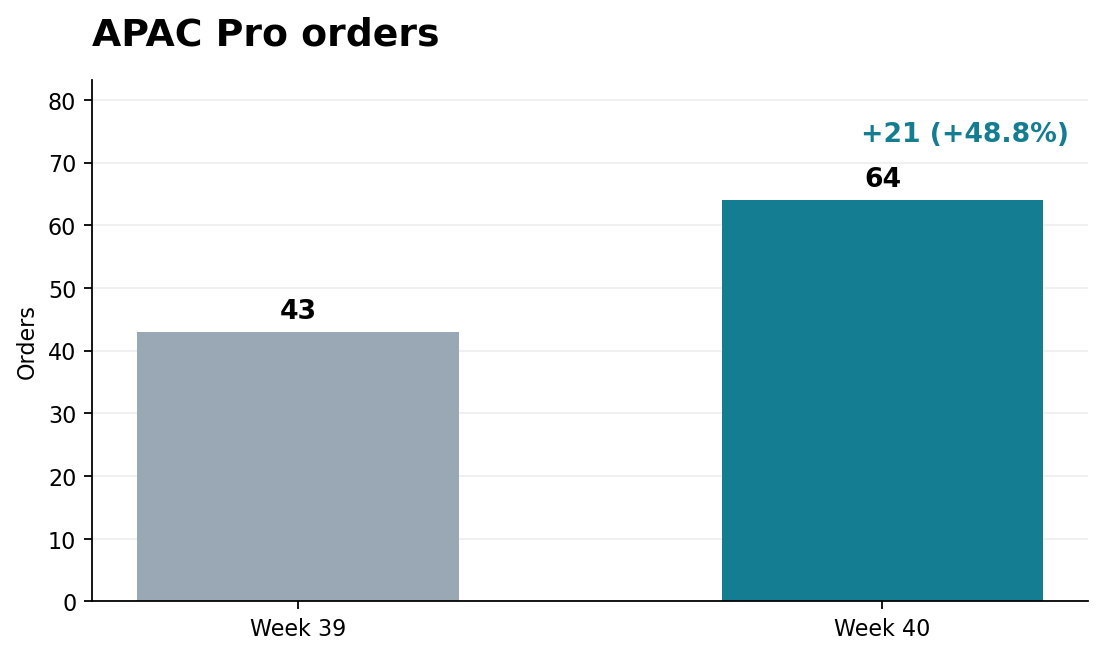
APAC Pro orders rose by 21, from 43 to 64 (+48.8%). Revenue rose by $1,659, from $3,397 to $5,056. [Chart: APAC Pro orders](charts/apac_pro_orders.png)

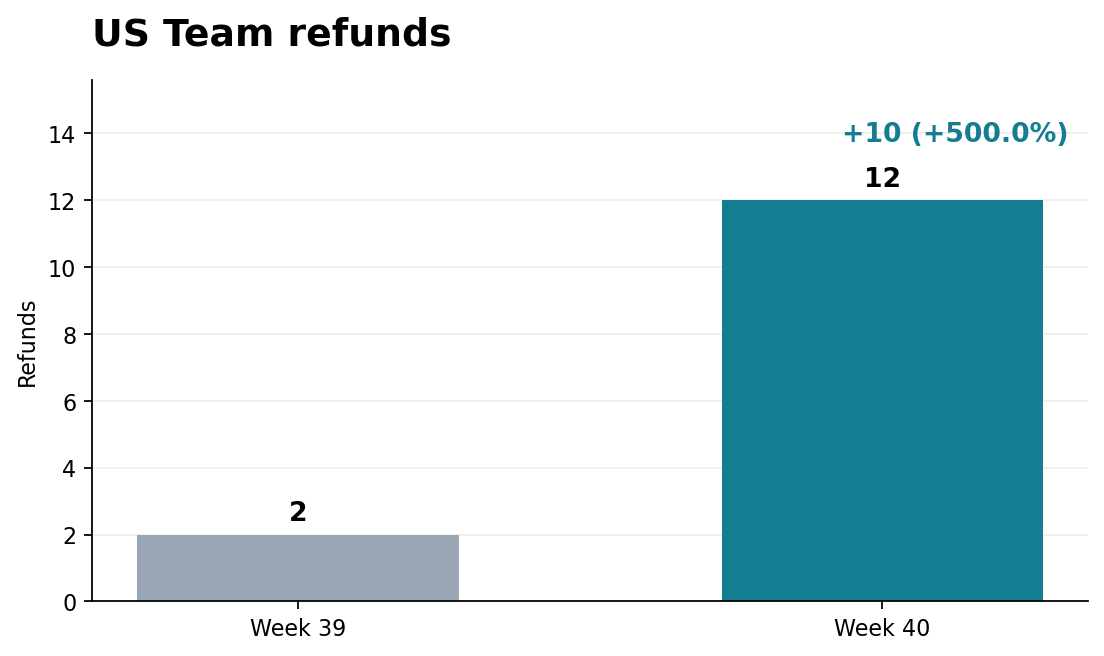
US Team refunds rose by 10, from 2 to 12. US Team orders rose by only 2, from 34 to 36. Check the cause of the higher refund count. [Chart: US Team refunds](charts/us_team_refunds.png)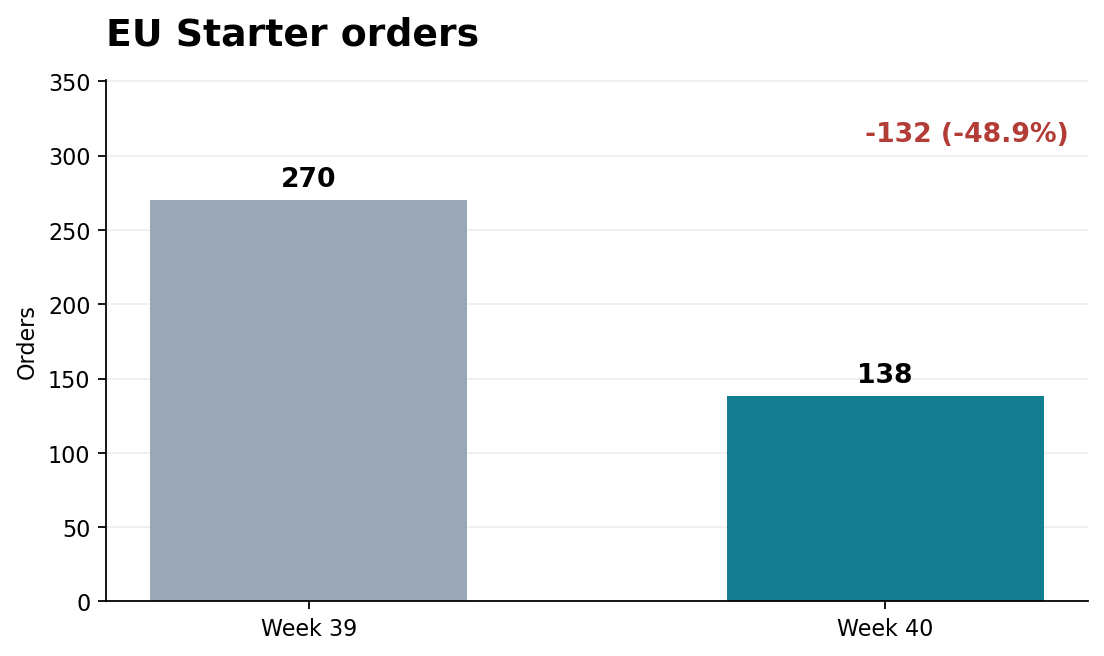
To start the run each Monday, put the export and the run in a script for cron:
$ cat weekly.sh
#!/bin/sh
set -e
export JINN_KEY=…   # a key with the run scope for monday-report
./export-csv.sh ./in    # writes last_week.csv and this_week.csv
jinn run monday-report --prompt "Week $(date +%V)" --in ./in --out "./reports/$(date +%F)"
$ crontab -l
0 9 * * 1 /opt/reports/weekly.sh
Examine a web page on a phone
The agent opens a page of a website in headless Chromium, at the width of a phone. It examines the screenshots and the links, and reads the HTML and CSS. It returns the problems that a visitor sees, with the cause and the correction of each problem, and screenshots. The sample is the site of a small café, with some usual errors.
page-check/
  function.json
  in/site/beans.svg
  in/site/index.html
  in/site/menu.html
  in/site/style.css
  in/site/visit.html
  out/findings.md
  out/shots/index.png
{
"name": "page-check",
"agent": {
"system_prompt": "/workspace/in/site is a website. Examine the page that the prompt names, as a visitor on a phone sees it. Make screenshots at the size of a phone screen with headless Chromium, for example: chromium --headless --no-sandbox --hide-scrollbars --window-size=390,844 --screenshot=/workspace/out/shots/page.png file:///workspace/in/site/index.html. Look at each screenshot with the read tool. Make sure that all links work. Make sure that no part of the page is wider than the screen. Make sure that all text is easy to read, and that all images have alt text. Read the HTML and CSS to find the cause of each problem. Write /workspace/out/findings.md: each problem, the most important problem first, with what a visitor sees, the cause and the correction. Keep a PNG screenshot of each problem that a visitor can see in /workspace/out/shots/. Write in ASD-STE100 Simplified Technical English. Then call complete."
},
"input_manifest": [
{ "path": "site/", "description": "The website's files" }
],
"output_manifest": [
{ "path": "findings.md", "description": "The problems and their corrections" },
{ "path": "shots/", "description": "Screenshots of problems" }
]
}$ curl -sL https://docs.usejinn.com/examples/page-check.tar.gz | tar -xz
$ cd page-check
$ jinn publish function.json
→ page-check fnc_b8bf4b627bba192840ece5b7 v5
$ jinn run page-check --prompt "Examine index.html." --in ./in --out ./result
run_e1736f431206100e9c4cd99b queued · page-check v5
run_e1736f431206100e9c4cd99b running
agent bash {"command":"find /workspace/in/site -maxdepth 2 -type f | head -30; mkdir -p /workspace/out/shots; ls -la /workspace/in/site","timeout_ms":300000,"workdir":"…
agent read {"file_path":"/workspace/in/site/index.html","limit":null,"offset":1}
agent bash {"command":"cat /workspace/in/site/style.css; for f in /workspace/in/site/*.html; do echo ----$f; done; chromium --headless --no-sandbox --hide-scrollbars --…
agent read {"file_path":"/workspace/out/shots/index.png","limit":null,"offset":null}
agent bash {"command":"cat /workspace/in/site/{menu.html,visit.html}; python3 - <<'PY'\nfrom pathlib import Path\nPY\n","timeout_ms":300000,"workdir":"/workspace"}
agent bash {"command":"python3 - <<'PY'\ntry: import playwright; print('yes')\nexcept Exception as e: print(e)\nPY\n","timeout_ms":300000,"workdir":"/workspace"}
agent write {"content":"# Findings — index.html\n\n## 1. The page is wider than a phone screen\n\n**What a visitor sees:** On a 390-pixel phone screen, the hero headin…
agent complete {}
✓ succeeded in 33.1s
result/findings.md 2.4 KB
result/shots/index.png 47.9 KB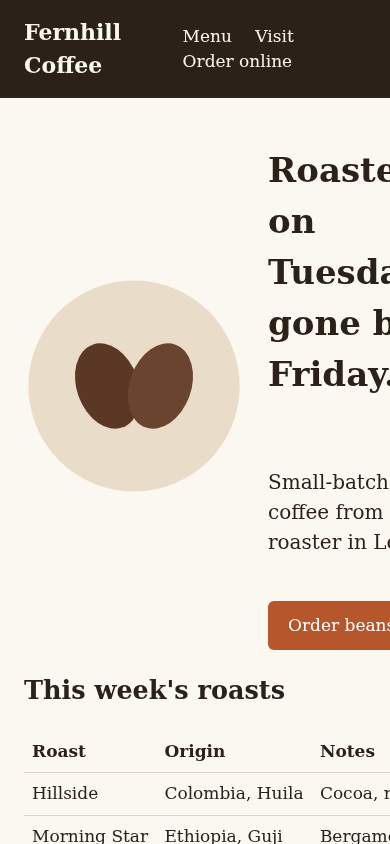
result/findings.md gives four problems, the most important problem first:
- The page is wider than a phone screen.
- The Order online links do not work.
- The coffee image has no alternative text.
- Small text has low contrast.
The first problem, as the run wrote it:
## 1. The page is wider than a phone screen

**What a visitor sees:** On a 390-pixel phone screen, the hero heading and paragraph are cut off at the right edge. The roast table also continues beyond the screen, so the Notes and later columns are not visible. The header links wrap awkwardly. See `shots/index.png`.

**Cause:** `index.html` does not set a viewport meta tag. In `style.css`, `.hero` always uses a 220-pixel image column plus a text column and gaps. `.roasts` has a fixed width of 820 pixels. The header also has fixed horizontal padding and does not have a mobile layout.

**Correction:** Add `<meta name="viewport" content="width=device-width, initial-scale=1">` in the page head. Add a small-screen media rule to make `.hero` a single column and reduce its image size. Let the table fit the screen: use a responsive table layout, or place it in a labelled horizontal scroll area. Allow the header links to wrap or stack. Check that the page has no horizontal overflow at phone width.
To examine a site on the internet:
- Remove
input_manifestfrom the function. - Put the address of the site in the prompt.
- Start the run without
--in.